Changing a SWMS (versions)
Edit a finalised SWMS without losing the old one.
Why versions
A SWMS must be reviewed when the work, the site or the controls change. OneClickSWMS keeps every finalised version exactly as it was, so you always have a record of what your crew signed.
Make a new version
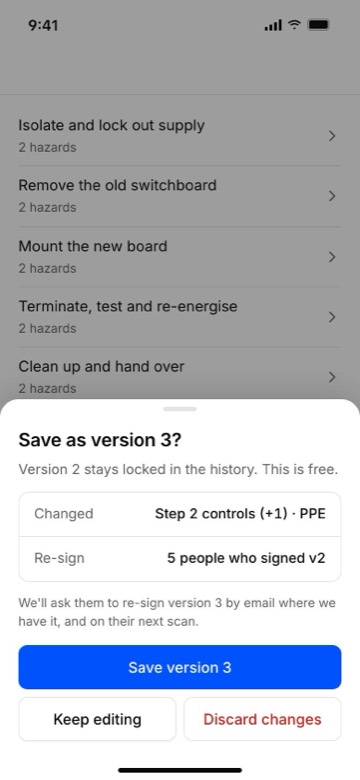
Open the finalised SWMS and tap Edit. You're editing a copy: the banner says "You're editing a copy of version N. Done saves it as version N+1."
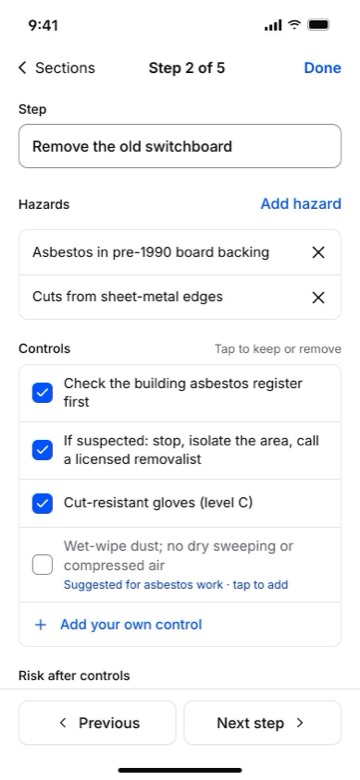
Change what you need. Tap a section to edit it, add your own controls, or change the risk after controls. Changes save as you go.
Tap Done, then finalise the new version. New versions of a finalised SWMS are free: no credit is used.
What your crew sees
The same QR code and link now open the new version. Workers who signed an earlier version are asked to read the changes and sign again. The changes are marked in the margin, so they can see what's different.
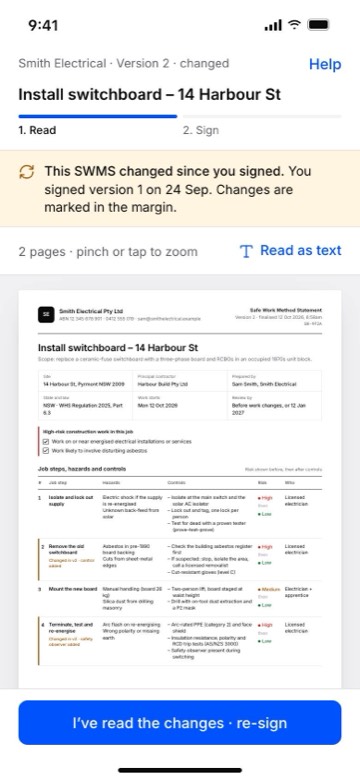
The sign-on register shows which version each person signed.
Earlier versions
Open the SWMS and tap Versions to see every version with its date. Each one keeps its own PDF and its own sign-ons. You can download any version at any time.
Drafts
A draft that has never been finalised isn't a version yet. Edit it as much as you like; a credit is used only the first time you finalise it.