Describe the job. Watch your SWMS take shape.
Job steps, hazards, controls and PPE, drafted for your state. Start with your own words.
AI-assisted SWMS · Australian trades
Type the job. AI drafts a Safe Work Method Statement for your trade and state. You check it, finalise it, and your crew sign on by link or QR.
From A$39 a job. A SWMS is used when you finalise.
View sample SWMS
Scan. Read. Sign.
Sample QR · sign-on guideFrom the first draft to the last sign-on
Your SWMS, in your hands
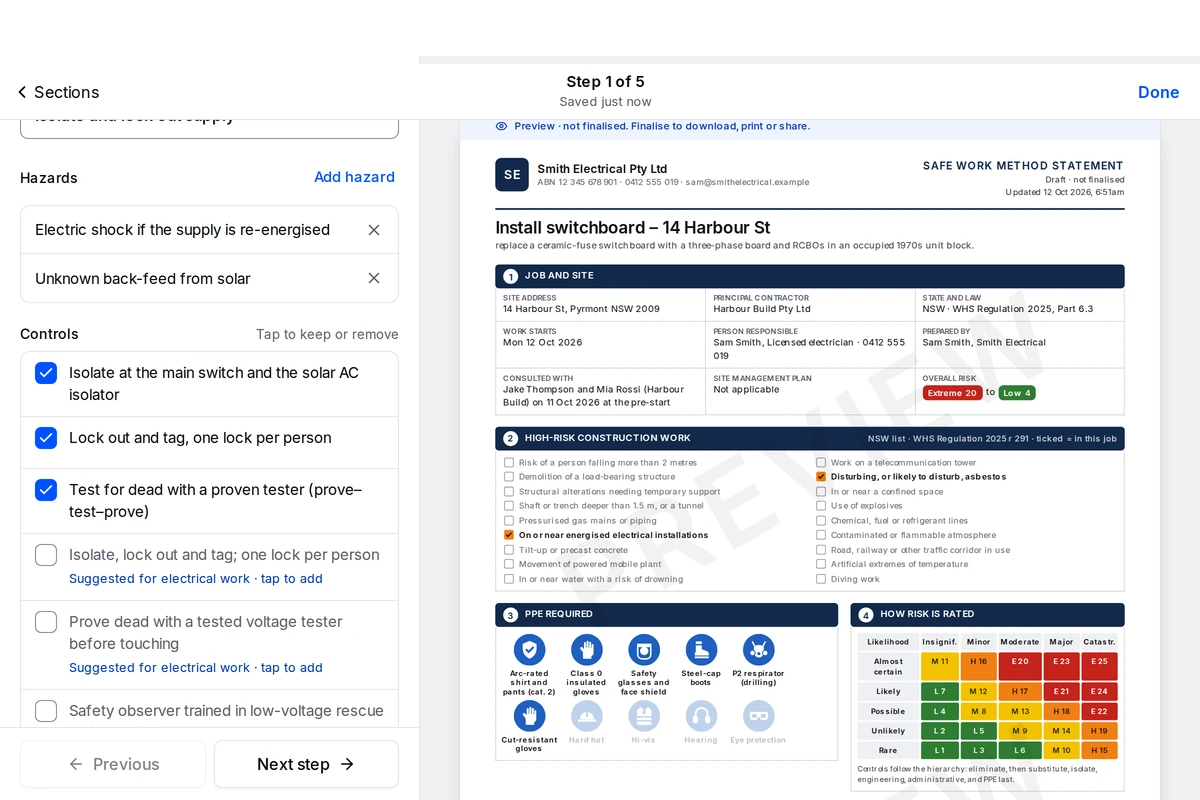
AI drafts the steps, hazards and controls. You bring the knowledge of the job and the site.
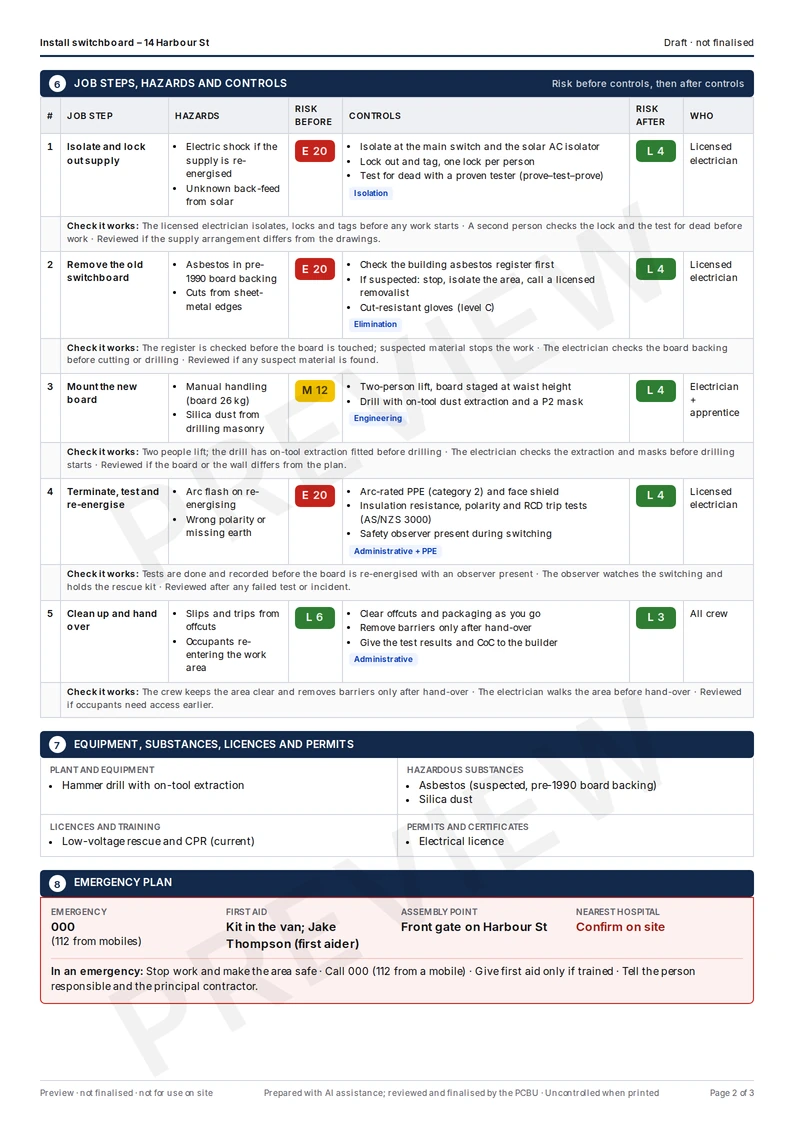
Your state's high-risk work, every step's hazards and controls with risk before and after, the PPE, an emergency plan, and a sign-on register.
Built for where the work happens
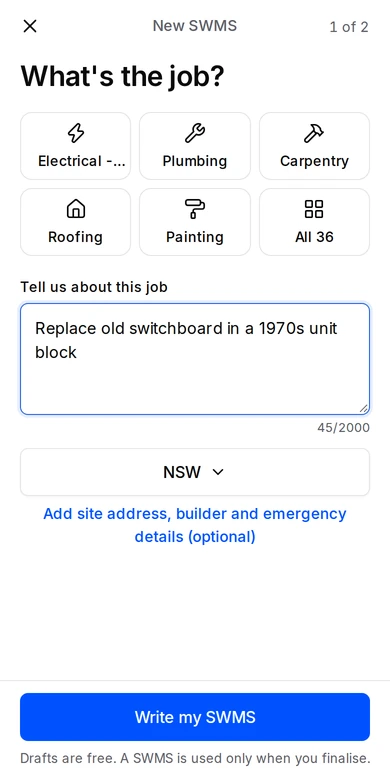
Say what the job is. Check the document. Get your crew signed on by QR or email. All from your phone.
Create, review and share in your browser. Your SWMS and records stay in your account, on your phone or desktop.
Describe your jobBring the crew onto the same page
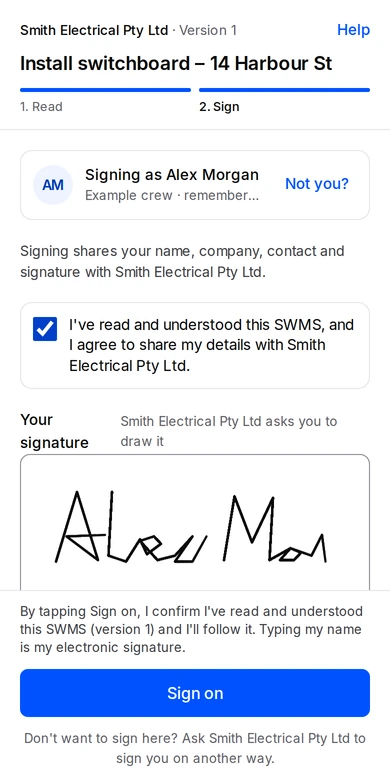
Share a link or print the QR. Workers read the SWMS, identify themselves and sign on their own phone. No account, no password.
Changed the SWMS? Finalise a new version and ask the crew to re-sign.
How crew sign-on worksAlex M. · SignedVersion 1 · Example crew
Alex MorganHow it works
Pick your trade or just describe it.
Steps, hazards, controls and PPE for your state, on the page. Edit anything.
Your crew scans the QR or opens the email link and signs. No app, no password.
Written for Australian WHS laws. You review it and talk it through with your crew before work starts.
In every SWMS
The full list for NSW, VIC, QLD, WA, SA, TAS, ACT or NT, ticked for this job.
Every step rated on a 5×5 matrix, in colour, with the control type.
Safety-sign style icons, so the crew sees what to wear.
First aid, the assembly point and the nearest hospital for the site, confirmed by you.
Name, version, time and receipt for every worker, in the PDF.
Change it on site; the crew is asked to sign the new version.
SWMS for your trade
Buy a SWMS or a plan, describe the job and AI drafts it. One job uses 1 SWMS when you finalise, whatever its high-risk work.
A$39 per SWMS
SWMS never expires
A$129 a year
120 SWMS · A$1.08 a SWMS if you use all 120
A$60 a month
10 SWMS · A$6 a SWMS if you use all 10
Every option: AI drafting · state high-risk work list · QR sign-on · PDF and register · versions and re-sign · export your data · prices in AUD, no GST charged
All prices in Australian dollars. No GST is charged (we're not registered for GST). One-off SWMS don't expire while we run OneClickSWMS — if we ever close, we refund unused ones. Plans renew automatically until you cancel; cancel online any time.
In testing · express interest
Collect SWMS and sign-ons from every subbie — we're testing this with a few builders. Tell us if you want in.
A few things worth knowing
About the document, the crew and what happens next.
Visit the help centreA Safe Work Method Statement lists the high-risk construction work in a job, its hazards, the controls you'll use and how you'll check they work. The business doing the work must have one before high-risk construction work starts.
It's written for Australian WHS laws, with the high-risk work list for your state. No tool can know your site, so you must check it fits the job and the site and talk it through with your workers before work starts. You're responsible for the final SWMS.
AI drafting needs a SWMS, from a pack or a plan. A SWMS is used when you finalise: one job uses 1 SWMS, whatever its high-risk work. Plan SWMS refresh at each renewal; bought SWMS don't expire while we run OneClickSWMS.
Yes. Cancel online any time in Account, no notice needed. Your plan runs to the end of the period you've paid for, and your SWMS and records stay.
No. Your crew scans the QR code or opens the link, reads the SWMS and signs on their phone. No app, no password.
Your SWMS, versions, PDFs and sign-ons stay in your account. You can view and download them free, any time, with or without a plan.
Yes. Edit the document and finalise a new version when the job or controls change. Earlier versions stay in your account, and workers can sign on to the updated version. Review the changes with your crew before work continues.
Yes. Create, edit, review and share from your phone's browser, or use a desktop. You don't need to install an app. Check the draft against your job and site before finalising.
Workers scan the QR or open the link, read the current SWMS and enter their details. They draw their signature on screen. Each sign-on records the version in your register. Workers don't need an account.
Describe your job and choose Start my SWMS. Sign in with your email, then check the draft for your job and site. AI drafting needs a SWMS pack or plan, and the sample SWMS is free to view.
Guides
Type the job and AI drafts it. A SWMS is used when you finalise.
We'd like to use analytics and ad cookies (Google, Microsoft) to see which pages help people and to measure our ads. They're off unless you allow them. Privacy Policy